

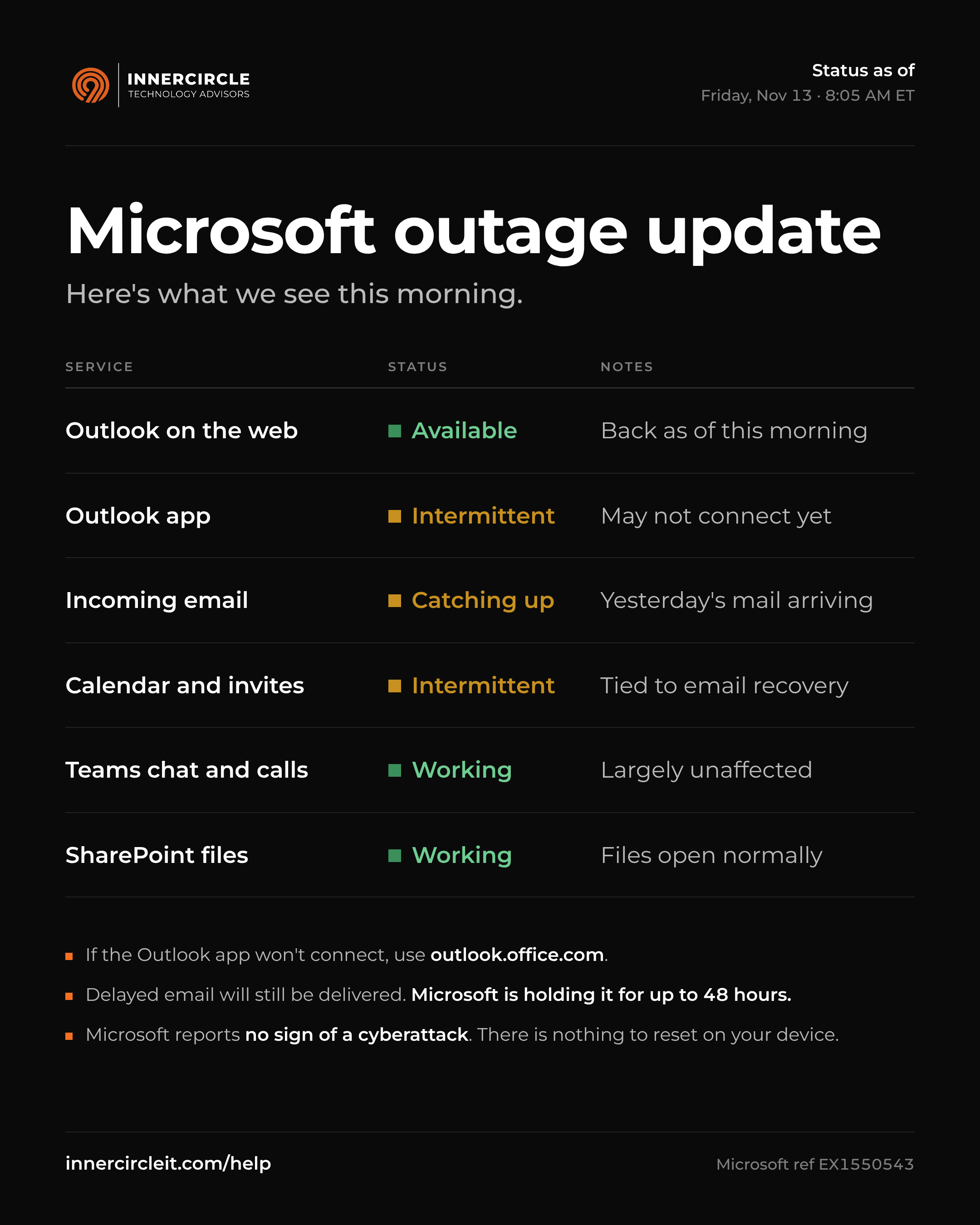
Update, Friday, November 13, 8:05 AM ET: Microsoft 365 is starting to come back in the US, slowly. Outlook on the web is working again, and email delayed since Thursday is now arriving. The Outlook app may still have trouble connecting. Microsoft is holding delayed email for up to 48 hours, so messages sent during the outage should arrive rather than bounce. Microsoft reports no evidence of a cyberattack. We will update this post when service is fully restored.
What happened
On November 12, 2026, a broad Microsoft 365 outage centered on Exchange Online, the service behind Outlook email, disrupted organizations around the world. Service problems began at about 12:54 PM ET. Many Microsoft 365 services depend on Exchange Online, so the impact spread well beyond email. The Wall Street Journal, Bloomberg, and New York Times covered the outage as it developed. Microsoft tracked the incident under EX1550543 on its service health dashboard.
If your firm runs on Microsoft 365, you may have seen:
Outlook failing to open your mailbox on desktop, web, or mobile, and email arriving late
Copilot Chat not loading, or Copilot unable to reach your email, calendar, and files
Teams calendar and meeting scheduling failing, while chat and online meetings largely kept working
SharePoint features tied to email failing, while files stored in SharePoint stayed available
Planner and To Do not loading or failing to save tasks
Errors when sending print jobs through Universal Print
Admin and security portals, including the Microsoft 365 admin center, Defender, Intune, and Purview, failing to load some pages
Timeline
How the outage unfolded
- Thursday, shortly before 1 PM ET: Outlook email began failing for users in the Americas.
- Thursday afternoon: Microsoft confirmed the issue could affect Microsoft 365 users in any region.
- Thursday evening: Early fixes did not hold, and Microsoft changed its approach.
- Overnight: Recovery began in Asia Pacific, then Europe.
- Friday, 7:15 AM ET: We saw the first signs of recovery in the US.
Was this a cyberattack?
No. Microsoft reports no evidence of malicious activity. It has committed to publishing a full post-incident report with the root cause once service is restored. We will share the key findings with clients when it is available.
What InnerCircle did for clients
Our own email was affected too, so we used other channels to keep clients informed.
We sent our first client update via our socials at 2 PM ET and continued throughout the day and night.
Sent desktop notifications directly to client computers, so staff who don't follow social media still received updates.
We contacted each client's primary contact directly with status updates.
Our team worked overnight to monitor Microsoft's recovery and confirm restoration for each client.
What you can do during an outage like this
Check our social media feeds on LinkedIn and X for status updates.
Check Microsoft's status page before you troubleshoot your own device. A restart will not fix a cloud outage.
If the Outlook app won't connect, use Outlook on the web at outlook.office.com.
Try to use Teams chat and online meeting tools for internal communication, since those largely kept working. Use the phone for outside parties.
Keep a printed or offline list of key contacts.
Don't resend messages. Microsoft holds delayed email for up to 48 hours, so it should still be delivered.
Watch for outage-themed phishing. Microsoft's Safe Links link checking may not work during the outage, so take extra care before you click. Attackers also send fake "reset your mailbox" emails and make fake Microsoft support calls during disruptions like this. If something feels off, stop and report it.
Lessons for professional firms
Concentration risk is real. When email, files, chat, and AI tools all run on one platform, one outage can stop your whole firm. Most firms will not leave a provider like Microsoft, and they don't need to. They do need to know which business processes depend on it and what the fallback is for each one.
Communication plans matter as much as technical ones. During an outage, your people need to know what is happening, who to call, and what to tell partners, clients, and investors. If the plan relies on email, it fails exactly when you need it.
Investors and auditors will ask. Operational due diligence questionnaires ask more and more about vendor dependency and incident communication. A documented plan, tested before you need it, gives you a clear answer.
Questions to ask your team this week:
If email went down again next week, how would your staff learn about it, and from whom?
Do you have an up-to-date phone list for your IT provider, key vendors, and counterparties?
Has your business continuity plan been tested against a cloud outage, not just an office closure?
Need help?
If you are an InnerCircle client, submit a request at innercircleit.com/help. Our service desk is reachable during regular business hours at (800) 611-2960.
If you're not a client and your firm went through this outage without any update from its IT provider, we would be glad to talk about what a better plan looks like.