

ConsentFix: A Phishing Tactic Where MFA Isn't Enough
There's a new phishing technique spreading quickly right now, called ConsentFix. It's worth a few minutes of your time to review the tactics being used because this attack works differently than the phishing threats most people have learned to spot.
What's Happening
Most phishing attacks try to steal a password. ConsentFix skips that step entirely.
Instead, it tricks someone into approving what looks like a normal Microsoft sign-in request. Once approved, the attacker walks away with a working access pass instead of a password. Because the person completed a real sign-in, multi-factor authentication doesn't stop it.
A stolen access pass isn't the same as a stolen password. Resetting a password afterward doesn't always shut the door, since the access pass can stay valid until it's manually revoked.
Attack Pattern
These attempts tend to follow the same pattern, which makes them recognizable once you know what to look for.
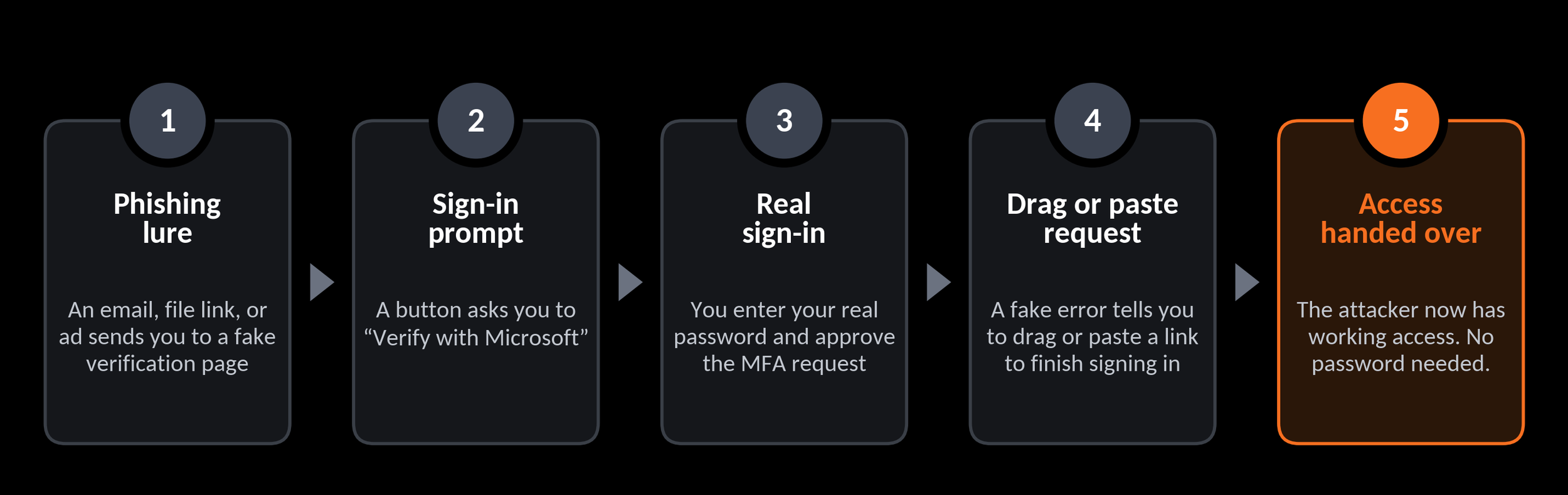
Five-step diagram of a ConsentFix attack, from phishing lure to sign-in prompt, real sign-in, a request to drag or paste a link, and the attacker gaining access
Nothing gets installed and no malware runs. The whole interaction happens inside what looks like a normal browser sign-in. That's why it can slip past people who are only watching for obviously fake login pages.
What to Watch For
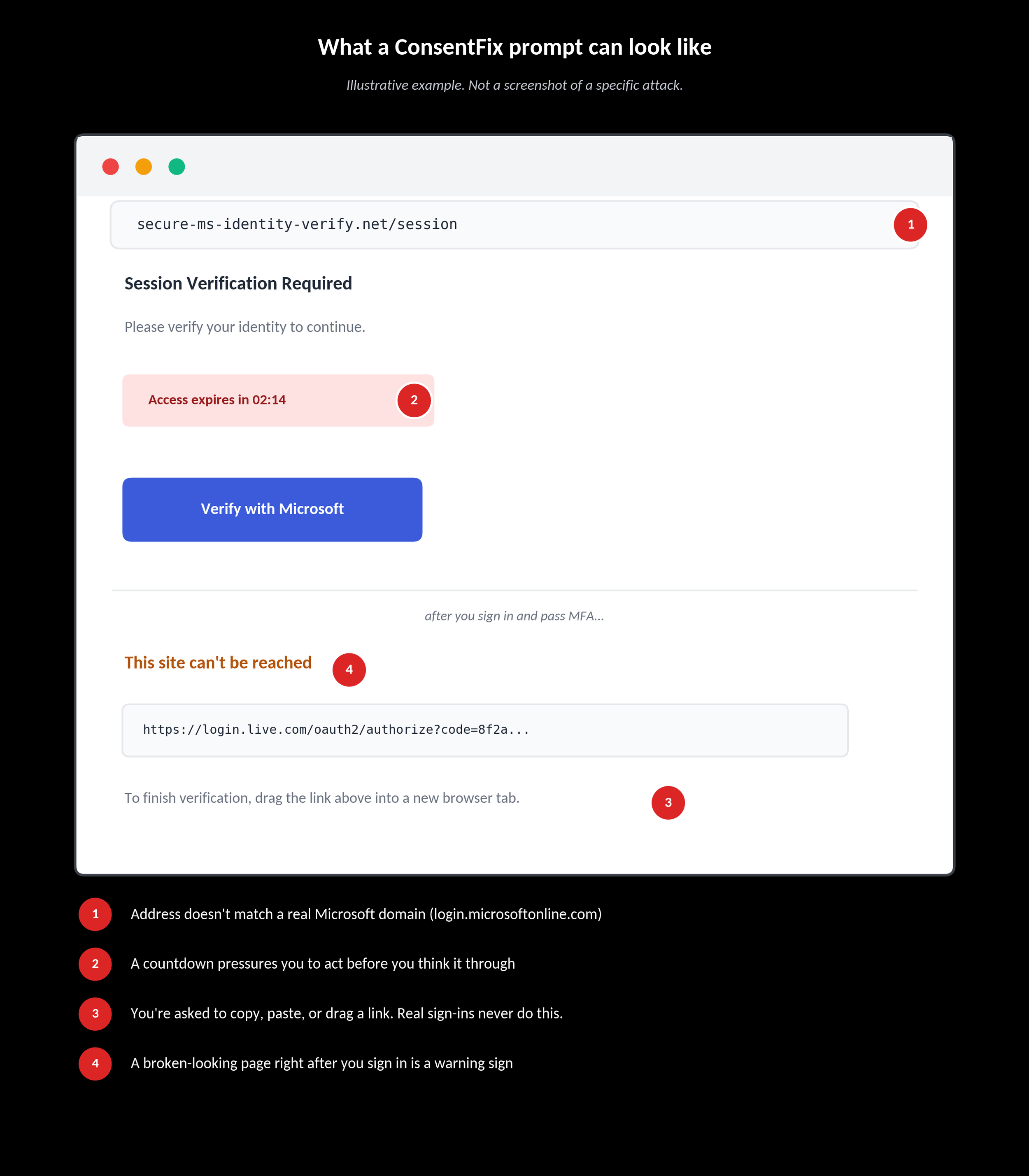
Here's what one of these prompts can look like, with the details worth flagging.
Where Your InnerCircle Coverage Fits
There is no single tool that blocks ConsentFix. The attack relies on a person completing a real sign-in, so awareness and education are the most effective defense.
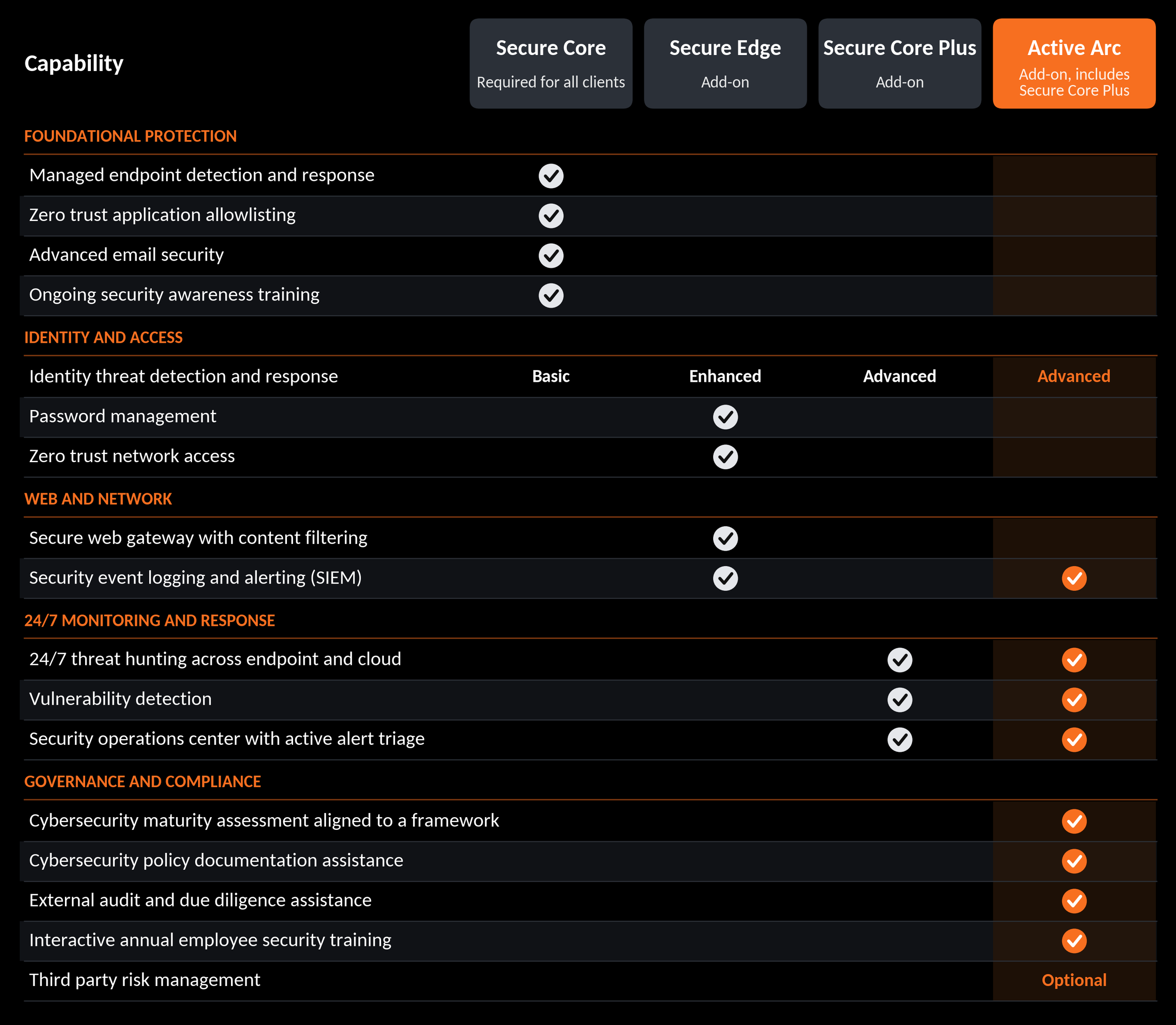
Our security layers reduce risk and can limit the impact if an attempt succeeds, but none of them can guarantee that a ConsentFix attempt is stopped. Here's what each package contributes.
Every client, through Secure Core:
Identity threat detection that can flag suspicious account activity
Advanced email security that catches some phishing lures before they reach an inbox
Ongoing security awareness training, the layer that matters most for this type of attack
Secure Edge adds:
Web content filtering that blocks some known malicious links and lookalike sites
Enhanced identity threat detection
Security event logging and alerting, so unusual activity is easier to spot
Secure Core Plus and Active Arc add:
A 24/7 security operations center that monitors endpoint and cloud activity
Analysts who triage alerts, which can shorten the time between a compromise and a response
Advanced identity threat detection
Active Arc also includes interactive annual employee training, framework-aligned maturity assessments, and policy support
Here's how our different security packages compare.
Your Risk Posture Beyond the Alert
Your managed environment also has safeguards that limit how far a compromised account can reach:
Limits on which third-party apps and services can connect to your systems
Ongoing monitoring of new app permission requests, so a suspicious one doesn't go unnoticed
Access kept to what people actually need, so one compromised account can't reach further than it has to
Zero trust controls, so trust isn't assumed just because a session looks authenticated
What You Can Do
If a sign-in step ever asks you to copy, paste, or drag something, stop and check with us first. Real Microsoft sign-ins never require that.
Think twice before approving a new app's request to access your account, especially from an unexpected email or link.
When something feels off, reach out. We'd rather answer a quick question than clean up a bigger problem later.
Questions about how this applies to your environment? Contact the InnerCircle team.